Generative AI / Technical Workflow
FLUX.1-dev — ComfyUI Image Generation Workflow
Technical Project
Building a local FLUX.1-dev text-to-image generation workflow from scratch in ComfyUI, diagnosing a hardware/compatibility failure, and resolving it by migrating from an NF4/bitsandbytes quantized setup to a GGUF quantized pipeline that runs reliably on a consumer-grade 8GB GPU.
Overview / Objective
Goal of the project
The objective was to set up a fully local, working image-generation pipeline using FLUX.1-dev inside ComfyUI, without relying on cloud inference. The workflow needed to run entirely on my own hardware — an RTX 5050 with 8GB of VRAM — which meant the model had to be quantized to fit within a limited memory budget while still producing usable, photorealistic output.
This project was built to demonstrate practical, hands-on generative AI capability: not just running a pre-made workflow, but constructing it node by node, understanding why it fails, and re-engineering it until it works.
Workflow & Architecture
How the ComfyUI graph was structured
The workflow was built manually in ComfyUI using the standard FLUX node graph, with each component selected and connected individually:
- DualCLIPLoader — loads the two text encoders required by FLUX for prompt conditioning.
- CLIP Text Encode (Prompt) — converts the text prompt into conditioning for the sampler.
- Load Diffusion Model (UNET Loader) — loads the FLUX.1-dev checkpoint in its quantized form.
- ModelSamplingFlux — applies FLUX-specific sampling adjustments (resolution-dependent shift) required for correct denoising behavior.
- VAE Loader / VAE Decode — decodes the latent output into a final pixel-space image.
- KSampler — runs the diffusion sampling loop using the conditioning, model and latent inputs.
- Empty Latent Image — defines the target output resolution (768×768) before sampling.
- Save Image — outputs the final generated result.
All nodes were connected manually to understand the data flow between the text encoders, the diffusion model and the VAE, rather than relying on a pre-built template.
Development Process
Building the workflow from scratch
I started with a clean ComfyUI installation and built the FLUX.1-dev graph from the ground up, node by node, rather than importing a ready-made workflow. This included:
- Installing and configuring ComfyUI locally.
- Sourcing the correct FLUX.1-dev model files, CLIP encoders and VAE.
- Connecting the DualCLIPLoader, prompt conditioning, model loader, ModelSamplingFlux, KSampler and VAE Decode nodes into a working graph.
- Testing generation at a fixed 768×768 resolution appropriate for the available VRAM.
The first working version of the pipeline used the NF4 (bitsandbytes) quantized version of FLUX.1-dev, which is a common approach for reducing VRAM usage.
Troubleshooting / Errors & Solutions
Diagnosing a CUDA / quantization compatibility failure
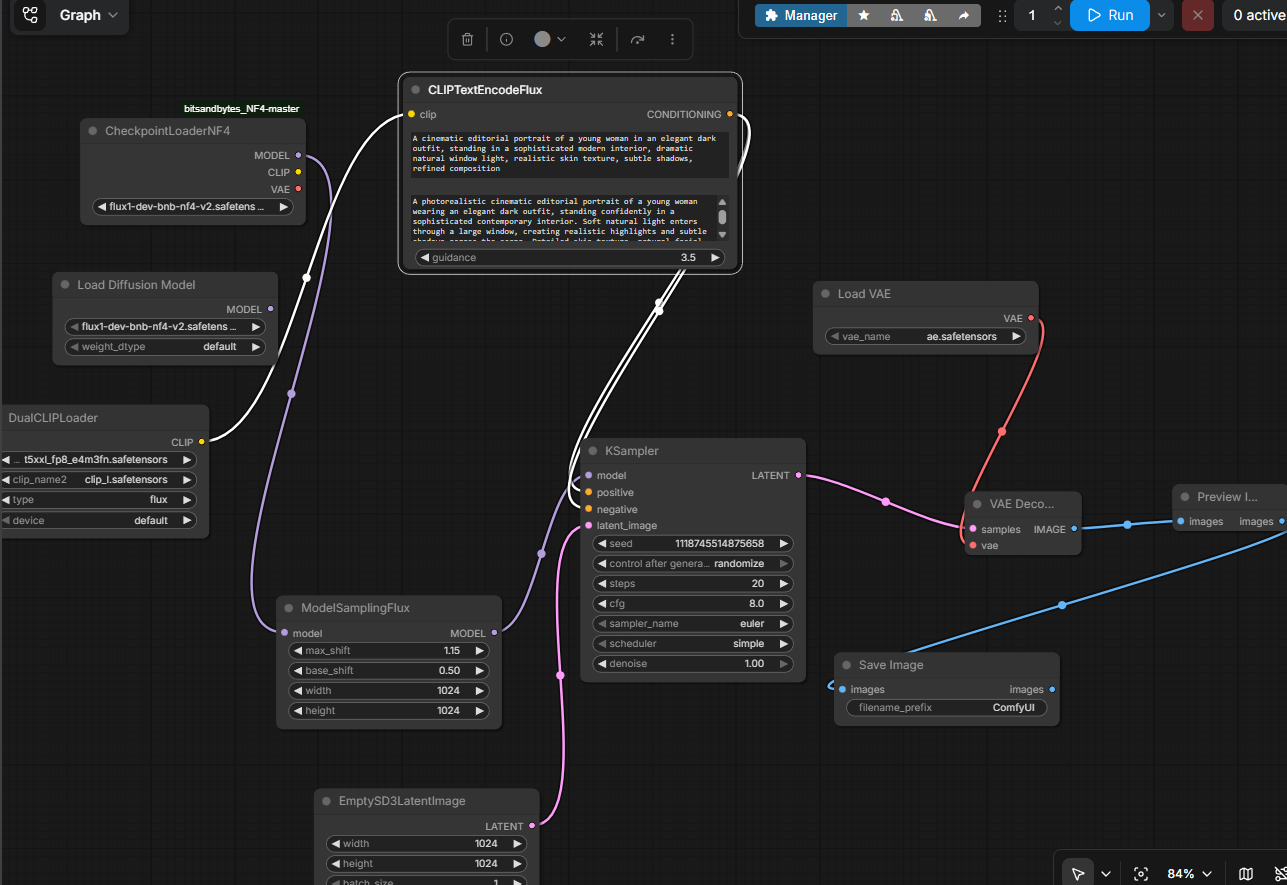
The first implementation used an NF4 quantized FLUX.1-dev checkpoint through a custom ComfyUI bitsandbytes node. The model loaded successfully and the workflow reached the sampling stage, but generation failed inside the CUDA execution path.
Observed error
RuntimeError: invalid argument to getCurrentStream
The error did not originate from the prompt, sampler configuration or VAE. The stack trace showed the failure occurring inside the bitsandbytes 4-bit matrix multiplication/dequantization path, specifically while obtaining the CUDA stream used by the quantized linear operation.
What I investigated
- Verified that PyTorch detected the NVIDIA GPU correctly.
- Verified CUDA availability from the ComfyUI Python environment.
- Confirmed the installed PyTorch build was 2.7.0 + CUDA 12.8.
- Installed and verified the bitsandbytes dependency.
- Confirmed that the failure occurred specifically during NF4 inference rather than during model loading.
- Tested the workflow structure independently to rule out incorrect node connections.
Root cause
The failure was isolated to the NF4/bitsandbytes CUDA execution path. The model loaded successfully and the workflow reached the sampling stage, but the 4-bit operation failed when the KSampler began the denoising process. This indicated that the issue was occurring during quantized CUDA execution rather than during model loading or workflow construction.
Solution
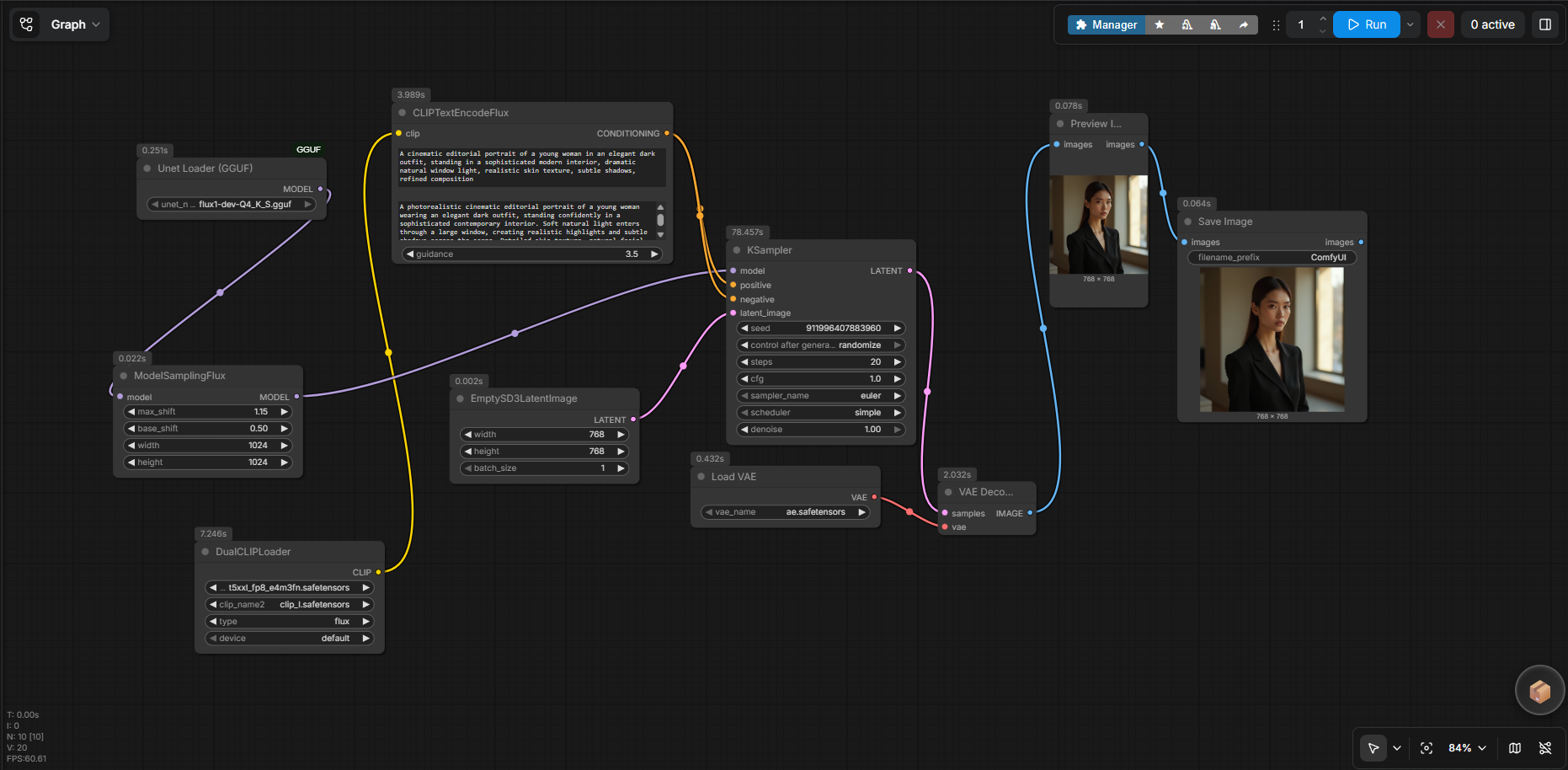
Rather than continuing with the failing NF4 implementation, I changed the model loading strategy and migrated the diffusion model to a GGUF-quantized version.
The workflow was rebuilt around the UNet Loader (GGUF) node while retaining the required FLUX text encoders, ModelSamplingFlux, KSampler and VAE components.
Technical Outcome
From failed inference to a working local pipeline
Initial approach
NF4 + bitsandbytes
- 4-bit quantized FLUX.1-dev checkpoint
- Custom bitsandbytes NF4 node
- Model loaded successfully
- Inference failed during CUDA execution
Final approach
GGUF quantization
- GGUF quantized FLUX model
- Native GGUF UNet loader
- Existing FLUX conditioning pipeline retained
- Successful local image generation
The final workflow successfully generated a photorealistic editorial portrait locally, demonstrating that the pipeline could run reliably within the constraints of an RTX 5050 with 8GB of VRAM.

Workflow Artifact
Reproducible ComfyUI workflow
The final node graph was exported as a ComfyUI workflow JSON so that the complete pipeline structure can be inspected and reproduced rather than presenting only a visual screenshot.
flux-workflow.json
Exported ComfyUI workflow containing the model, conditioning, sampling, latent and VAE connections used for the final generation.
Skills & Technologies
Technical stack
Outcome & Learning
What this project demonstrates
This project demonstrates more than the ability to generate an image with a generative AI model. It shows the ability to build a technical workflow from individual components, interpret execution failures, identify the failing layer, evaluate alternative model formats, and adapt the implementation to the available hardware.
The key outcome was not simply getting the initial workflow to run, but understanding why it failed and re-engineering the architecture accordingly. The final result is a reproducible local image-generation pipeline that operates within an 8GB VRAM constraint.